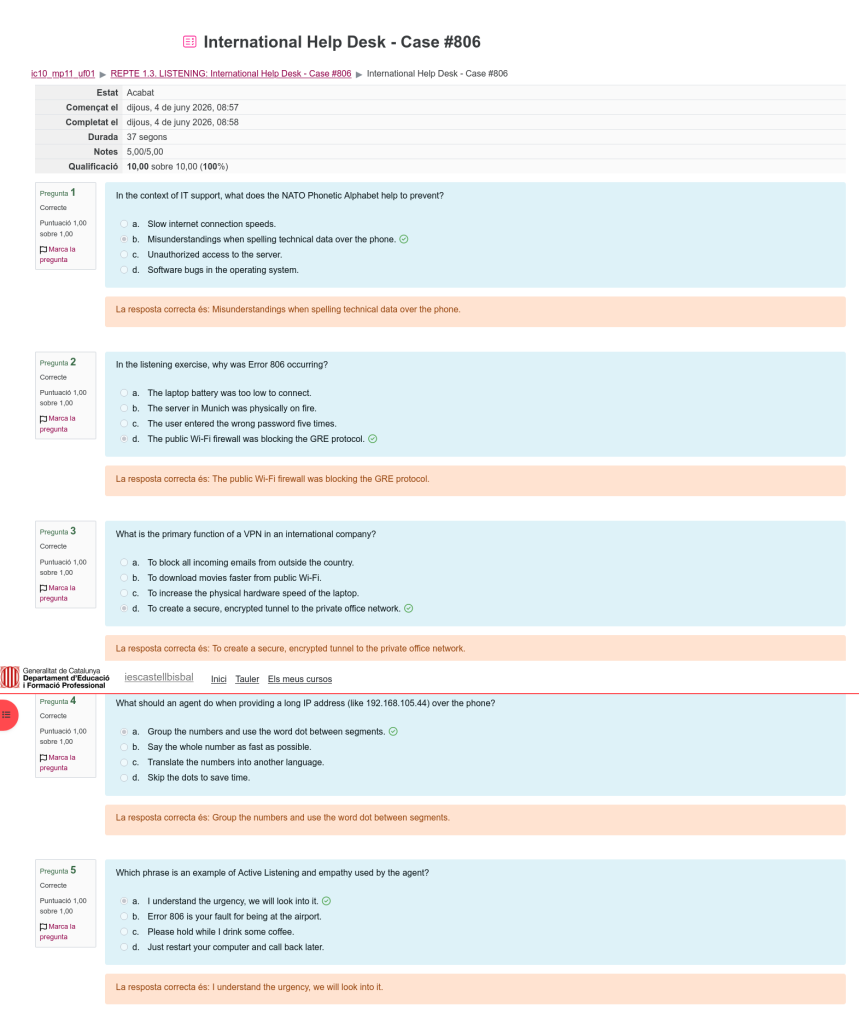
This document validates the technical choices made throughout the international phone support session, using IT terminology specific to the English language and tailored to the individual client’s background.
The technician correctly determined that error 806 was linked to the GRE (Generic Routing Encapsulation) protocol being blocked by the public Wi-Fi network. Understanding this protocol is fundamental for most IPsec-based VPN connections.
- VPN tunnel — to establish a secure connection between endpoints
- Gateway IP — referring to the corporate access point on the network
- Firewall restriction — to explain the security limitation blocking traffic
- Error code 806 — industry-specific error indicating GRE failure
- Authentication token — referring to short-lived temporary access credentials
- For clear articulation: Direct and concise technical language appropriate for trained professionals
- For technical industry jargon: Accurate and standardised terminology at all times
- For international communication: Patient, measured, and consistently precise in all explanations
The agent had a thorough understanding of every detail of the incident as reported in English, identifying the issue without needing further clarification from the client.
| 1. User Information | |
| Full Name: | Michael Rodriguez |
| Employee ID: | MCP-7294-DELTA |
| Location: | Frankfurt International Airport, Terminal 1, Business Lounge |
| 2. Incident Details | |
| Device / Service: | Cisco AnyConnect VPN / Remote Access |
| Error Code: | 806 — Connection Failed |
| Description of Issue: | User unable to establish VPN connection from public airport Wi-Fi. Error 806 — Connection Failed displayed upon attempting. |
| Environment: | Public Wi-Fi (Airport Business Lounge) |
| 3. Resolution / Steps Taken | |
| Root Cause: | Public Wi-Fi network blocking GRE protocol (IP Protocol 47), required for standard VPN tunnel initialisation. |
| Solution Applied: | Reconfigured connection to use alternative gateway with SSL/VPN (port 443) rather than standard IPSec VPN. |
| New Gateway IP: | 10.0.85.1 (pronounced: «One-Zero-DOT-Zero-Eight-Five-DOT-One») |
| 4. Status | |
| Resolution Status: | Resolved Escalated Pending Resolution Time: 22 minutes |
NATO Phonetic Alphabet Reference:
| Letter | Word | Letter | Word |
|---|---|---|---|
| A | Alpha | N | November |
| B | Bravo | O | Oscar |
| C | Charlie | P | Papa |
| D | Delta | Q | Quebec |
| E | Echo | R | Romeo |
| F | Foxtrot | S | Sierra |
| G | Golf | T | Tango |
| H | Hotel | U | Uniform |
| I | India | V | Victor |
| J | Juliet | W | Whiskey |
| K | Kilo | X | X-ray |
| L | Lima | Y | Yankee |
| M | Mike | Z | Zulu |
The following is a structured record of the complete international phone support process, including visual aids, screenshots, and well-organised technical content.
Screenshot of the error message 806 in the Cisco AnyConnect application confirming the failure to establish the VPN tunnel.
- Error code: 806
- Application: AnyConnect 4.10
- Protocol: IPSec/GRE
- Timestamp: 2024-02-06 09:12:22 CET
Documentation of the configuration for gateway 10.0.85.1 using SSL on port 443 (HTTPS), bypassing all public network restrictions.
- IP Address: 10.0.85.1
- Port: 443 (HTTPS)
- Protocol: SSL-VPN
- Authentication: Certificate
- OTP: active
- Cipher: AES-256-GCM
Verbatim transcript of the entire phone conversation in English with timestamps and speaker identification.
- Initial identification using phonetic alphabet
- Technical description of the problem
- Mutual comprehension verification
- Precise configuration instructions
- Resolution confirmation
This resource was accessed in the internal knowledge base for frequent error 806 cases in public Wi-Fi environments.
Technical content:- Symptoms of error 806
- Common causes (firewall, GRE protocol)
- Alternative gateways by region
- Open port verification
Documentation Methodology:
- 1Real-time records: Immediate documentation during the active call
- 2Standard identification: Confirmation of codes and identifiers using phonetic alphabet
- 3Standard organisation: Use of standard support ticket terminology
- 4Consistent detail: Use of specific technical terminology in the problem description
- 5Search indexing: Metadata tagging for future similar incidents
The documented handling of case #806 illustrates complete professional competence in every key area:
Solid technical justification: Decisions grounded in expert knowledge of network protocols and known firewall constraints.
Fluent IT terminology in English: Natural use of IT-specific terminology throughout the interaction, well-adapted to the international context.
Quality documentation: Accurate and well-structured evidence covering each stage of the resolution process.
Interpersonal skills: Efficient, patient, and effective communication in an international call-centre context.
Case #806 represents a benchmark in international IT support, combining technical expertise, linguistic precision, and interpersonal professionalism in a single interaction.